
10 Low Technology Teaching Moves That Still Work
Technology in the classroom has been on the rise over the last decade. Over time, using technology sometimes became a checklist item rather than an intentional instructional move designed to support student learning. Digital tools now often feel easier, faster, and more familiar.
This shift is also showing up in current guidance. In 2026, the American Academy of Pediatrics emphasized that digital media should be considered in terms of quality, purpose, and what it may displace—not simply the number of minutes spent on a screen. Their guidance notes that excessive digital media use can crowd out important experiences such as movement, social interaction, and other healthy developmental behaviors.
But when technology becomes the default, we risk losing sight of the most important question: Is this tool helping students learn, or has it simply become the way we always do things?
 As schools reconsider the amount and purpose of screen time during the school day, teachers are feeling a renewed pull toward more traditional instructional methods. This does not mean abandoning technology. It means becoming more thoughtful about when technology truly adds value and when students may benefit more from conversation, movement, handwriting, hands-on learning, collaboration, or creation.
In an effort to support student well-being, development, and learning, this blog post will share 10 low-tech teaching moves that still work. When we say low-tech, we do not mean boring, old-fashioned, or anti-innovation. We mean more conversation, movement, handwriting, manipulation, retrieval, collaboration, and creation. The emphasis is on student action, not the absence of a device.
Quick Tip
The U.S. Department of Education has also recently encouraged schools to focus on the instructional value of technology rather than using digital tools simply because they are engaging or available. Its August 2026 guidance specifically calls for educator judgment, evidence, and a continued focus on student outcomes while preserving the human-centered core of teaching.
Before swapping out a digital tool, ask:
- What are students actually doing?
- Is thinking is required?
- Is human interaction lost?
- What evidence of learning will I get?
Download the Tech Pressure Test to help you assess the impact of using—or not using—a specific technology tool.
Low-tech teaching strategies can restore visible thinking, peer interaction, physical engagement, productive struggle, and more immediate teacher observation. Although technology can save time, preserving the value of student learning should remain the priority.
Teacher efficiency and student learning both matter, but sometimes they pull in different directions.
10 Low-Tech Teaching Swaps to Try
Low-tech does not have to mean less engaging. In many cases, removing the screen can create more opportunities for students to talk, think, move, write, create, and interact with one another.
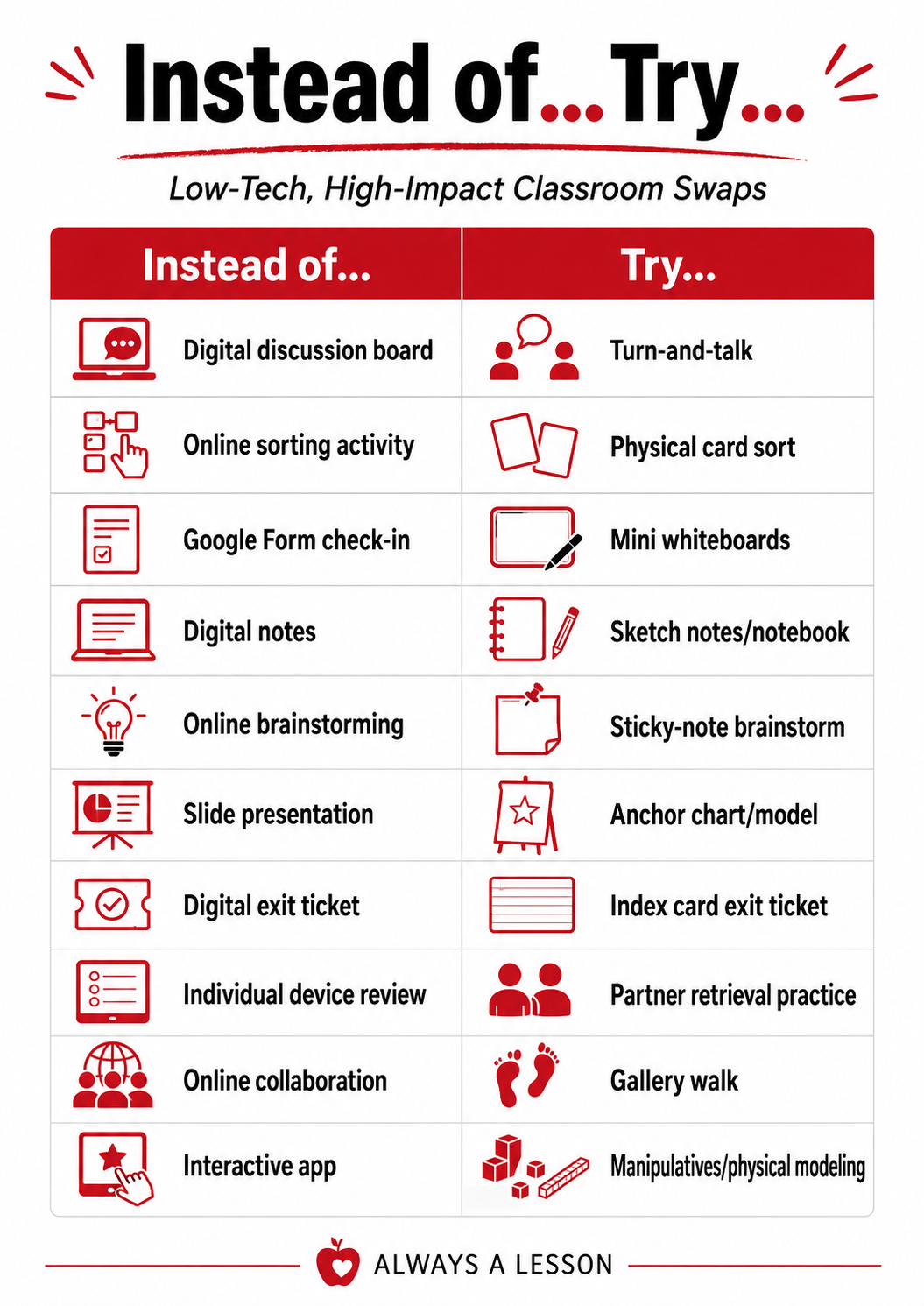
Here are 10 simple swaps to consider:
- Digital Discussion Board → Turn-and-Talk
Instead of having students type a response, give them time to explain their thinking to a partner. Speaking ideas aloud helps students clarify their understanding and gives them practice listening and responding to others. - Online Sorting Activity → Physical Card Sort
Print concepts, examples, vocabulary words, or steps onto cards and let students physically sort, categorize, sequence, or compare them. The hands-on element naturally encourages discussion and justification. - Google Form Check-In → Mini Whiteboards
Ask a question and have every student write and reveal an answer at the same time. You get immediate evidence of understanding without creating anything to grade. - Digital Notes → Sketch Notes or a Notebook
Give students space to record ideas by hand using words, diagrams, symbols, arrows, and examples. The goal is not beautiful notes—it is active processing of the content. - Online Brainstorming → Sticky-Note Brainstorm
Have students generate one idea per sticky note, then organize, group, rank, or discuss the responses. This makes thinking visible and allows students to physically interact with the ideas. - Slide Presentation → Anchor Chart or Model
Instead of clicking through every idea on a slide deck, build an anchor chart, diagram, worked example, or model with students as the learning unfolds. - Digital Exit Ticket → Index Card Exit Ticket
Ask one or two focused questions at the end of the lesson and have students respond on an index card or scrap of paper. A quick scan can tell you what needs to happen next. - Individual Device Review → Partner Retrieval Practice
Rather than sending students into an individual review program, have partners quiz one another, explain concepts, compare solutions, or recall information from memory. - Online Collaboration → Gallery Walk
Post student work, questions, examples, or problems around the room and let students move, observe, discuss, and respond. Movement can add energy while still keeping the focus on learning. - Interactive App → Manipulatives or Physical Modeling
Whenever possible, let students build, move, arrange, model, or demonstrate the concept with physical materials. Hands-on experiences can make abstract ideas more concrete and observable.
These swaps are not rules. The goal is not to replace technology simply for the sake of using less technology.
Instead, ask yourself: Which option creates the strongest learning experience for students?
Decision-Making Sequence
The following sequence can help you make stronger instructional decisions that better serve students:
NOTICE → QUESTION → SWAP → OBSERVE → DECIDE
These are not automatic replacements. The goal is to notice where a low-tech move may produce richer thinking, stronger interaction, or better evidence of learning.
- NOTICE: Where has technology become automatic?
- QUESTION: What is it adding?
- SWAP: What low-tech move could serve the same goal?
- OBSERVE: What changes in student thinking or interaction?
- DECIDE: Which version actually works better?
Next Steps
Here is a manageable challenge. Instead of trying to “reduce screen time” across your entire classroom, make the action small:
- Pick one lesson.
- Identify one digital task.
- Try one low-tech alternative.
- Watch what changes in student thinking, discussion, participation, or work quality.
Then decide what you want to keep, adjust, or try again.
Final Thoughts
We are not trying to recreate classrooms from the past. We are reclaiming high-value instructional practices that technology may have unintentionally displaced. The best tool is the one that best serves the learning.
Want to explore more resources? Check out my latest book or more helpful blog posts.
GO BE GREAT!


About the author, Gretchen
I am a teacher trainer and coach. Working elbow to elbow with teachers and teacher leaders to ensure instructional proficiency and student achievement soar lights me up. We have a real need in our nation for strong educators to remain in the field. My blog, book, podcast, courses and instructional materials are geared towards empowering teachers (and those that lead them) to receive the support needed to grow and thrive today, tomorrow and always.